# Dispositions des touches

La disposition des touches correspond aux fonctionnalités disponibles dans la caisse lorsque vous êtes positionnés sur un ticket ou un devis.
CAP Caisse vous propose de configurer une ou plusieurs dispositions de touches. Chaque disposition s'adapte au contexte (ticket en cours, ticket validé, devis) ainsi qu'aux caisses auxquelles elle est affectée.

## Créer une nouvelle disposition de touches

Pour créer une nouvelle disposition de touches,

1. Choisissez ![](/public/svg/search-right.svg) et tapez **Disposition des touches**.
2. Dans la liste qui s'ouvre, cliquez sur **Nouveau**.
3. Dans la fiche de l'enregistrement créé, renseignez le **Code** identifiant la disposition créée.

## Ajouter et personnaliser des contrôles

### Ajouter un contrôle
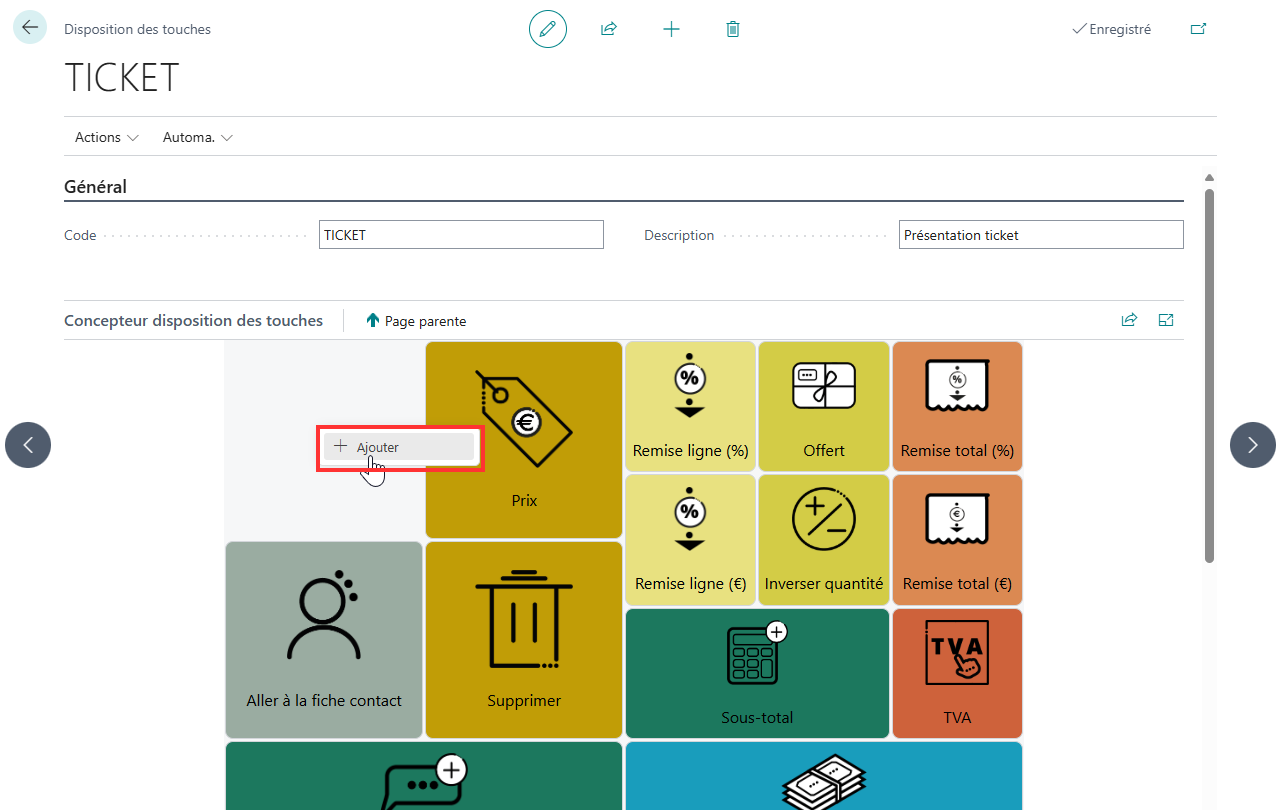
- Double-cliquez sur une zone vide de l’écran pour créer un nouveau contrôle.
- Le contrôle apparaît immédiatement dans la grille de disposition.
   ![Ajouter un controle](Images/setup-key-layouts-1.png)

### Accéder aux propriétés
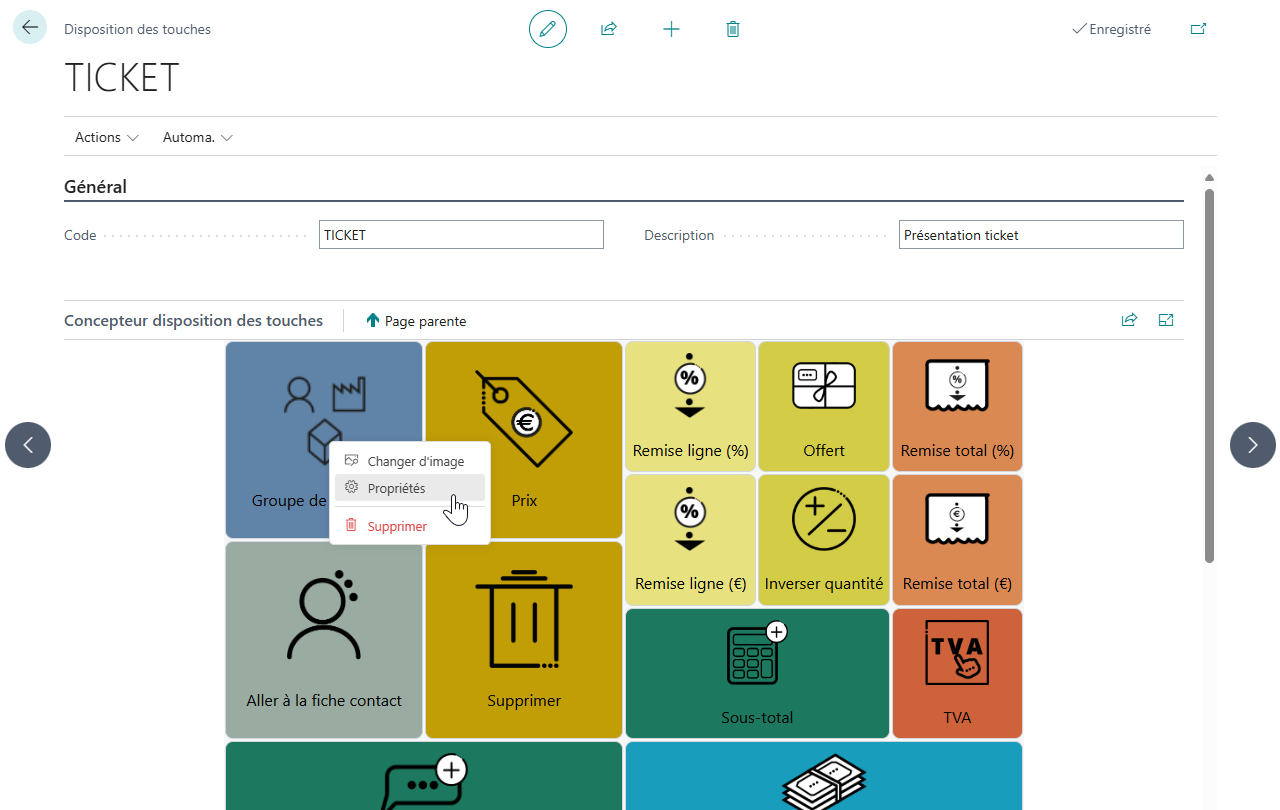
- Faites un clic droit sur un contrôle existant pour ouvrir le menu contextuel.
   ![Propriétés](Images/setup-key-layouts-2.png)
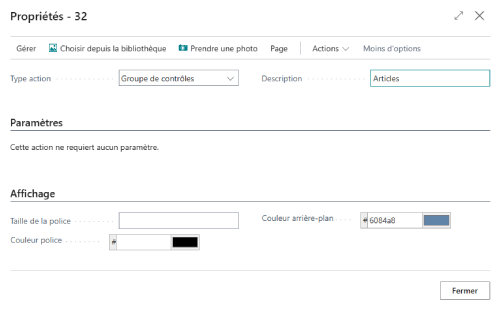
- Choisissez **Propriétés** pour configurer :
  - Le **type d’action** (ex. : Ajouter article, Groupe de contrôles…)
  - Le **titre** du contrôle
  - La **couleur du texte** et la **couleur d’arrière-plan**
  - L’**image** associée au contrôle
   ![Propriétés](Images/setup-key-layouts-3.png)

### Personnalisation visuelle

- Positionnement et taille :
   - **Glisser-déposer** le bouton pour le déplacer.
   - **Redimensionner** via la flèche en bas à droite du bouton.

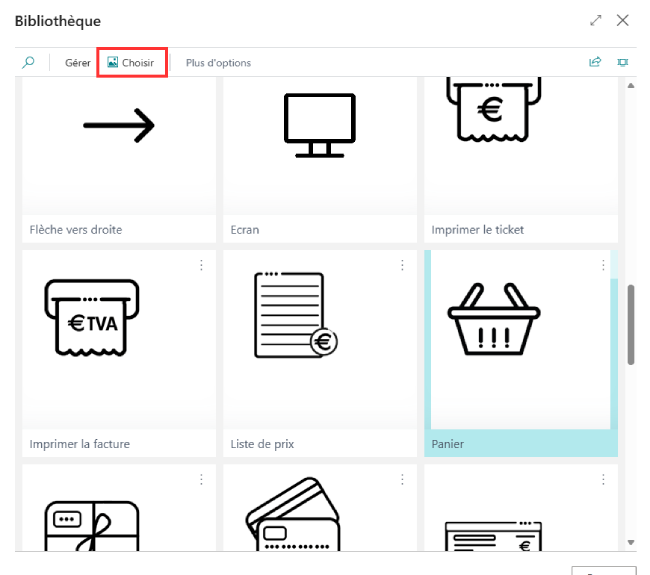
- Modifier l’image :
   - Faites un clic droit sur un contrôle existant pour ouvrir le menu contextuel.
   - Choisissez **Changer d'image** pour choisir une image depuis la **bibliothèque intégrée**
   ![Image](Images/setup-key-layouts-4.png)


## Créer une hiérarchie de contrôles

Un contrôle qui est un _Groupe de contrôles_ est destiné à accueillir des contrôles enfants. Sur l'application cliente CAP Caisse, ces contrôles enfants sont présentés comme un sous-dossier.
Un groupe de contrôles vous permet d'organiser les fonctionnalités sur l'écran de caisse et d'augmenter le nombre d'actions accessibles à l'écran.

Pour créer une hiérarchie,
1. Commencez par ajouter un nouveau contrôle ayant le **Type action** _Groupe de contrôles_.
2. Double-cliquez sur le **groupe** pour accéder à son niveau enfant.
3. À l’intérieur du groupe, suivez la procédure d'ajout des controles pour ajouter et organiser les controles enfants

> [!NOTE]
> Vous pouvez ajouter autant de niveaux que vous le souhaitez. Toutefois, nous vous recommandons ne pas excéder 3 niveaux pour conserver une bonne ergonomie dans le produit.

> [!WARNING]
> Vous pouvez attribuer des enfants à d'autres contrôles que des _Groupes de contrôles_. Toutefois, ces contrôles ne seront pas accessible dans CAP Caisse.


## Thèmes de couleurs

Pour l'arrière-plan des contrôles, nous vous recommandons l'usage des couleurs ci-dessous.

**Palette simple**

<table>
   <tr>
      <td><div style="background-color: #b98f47; width: 5em; height: 2em; text-align: center; padding-top: 0.5em; color: white;">#b98f47</div></td>
      <td><div style="background-color: #a35046; width: 5em; height: 2em; text-align: center; padding-top: 0.5em; color: white;">#a35046</div></td>
      <td><div style="background-color: #f2d9b7; width: 5em; height: 2em; text-align: center; padding-top: 0.5em; color: white;">#f2d9b7</div></td>
      <td><div style="background-color: #576667; width: 5em; height: 2em; text-align: center; padding-top: 0.5em; color: white;">#576667</div></td>
      <td><div style="background-color: #386e5b; width: 5em; height: 2em; text-align: center; padding-top: 0.5em; color: white;">#386e5b</div></td>
   </tr>
   <tr>
      <td><div style="background-color: #aa8d7f; width: 5em; height: 2em; text-align: center; padding-top: 0.5em; color: white;">#aa8d7f</div></td>
      <td><div style="background-color: #d9a385; width: 5em; height: 2em; text-align: center; padding-top: 0.5em; color: white;">#d9a385</div></td>
      <td><div style="background-color: #664261; width: 5em; height: 2em; text-align: center; padding-top: 0.5em; color: white;">#664261</div></td>
      <td><div style="background-color: #6084a8; width: 5em; height: 2em; text-align: center; padding-top: 0.5em; color: white;">#6084a8</div></td>
      <td><div style="background-color: #9aaca1; width: 5em; height: 2em; text-align: center; padding-top: 0.5em; color: white;">#9aaca1</div></td>
   </tr>
   <tr>
      <td><div style="background-color: #f4e0a7; width: 5em; height: 2em; text-align: center; padding-top: 0.5em; color: white;">#f4e0a7</div></td>
      <td><div style="background-color: #e1b5b4; width: 5em; height: 2em; text-align: center; padding-top: 0.5em; color: white;">#e1b5b4</div></td>
      <td><div style="background-color: #b58cb3; width: 5em; height: 2em; text-align: center; padding-top: 0.5em; color: white;">#b58cb3</div></td>
      <td><div style="background-color: #aac4ce; width: 5em; height: 2em; text-align: center; padding-top: 0.5em; color: white;">#aac4ce</div></td>
      <td><div style="background-color: #cdd9d5; width: 5em; height: 2em; text-align: center; padding-top: 0.5em; color: white;">#cdd9d5</div></td>
   </tr>
</table>

**Palette étendue**

<table>
   <tr>
      <td><div style="background-color: #A58500; width: 5em; height: 2em; text-align: center; padding-top: 0.5em; color: white;">#A58500</div></td>
      <td><div style="background-color: #823111; width: 5em; height: 2em; text-align: center; padding-top: 0.5em; color: white;">#823111</div></td>
      <td><div style="background-color: #720000; width: 5em; height: 2em; text-align: center; padding-top: 0.5em; color: white;">#720000</div></td>
      <td><div style="background-color: #990743; width: 5em; height: 2em; text-align: center; padding-top: 0.5em; color: white;">#990743</div></td>
      <td><div style="background-color: #3C3344; width: 5em; height: 2em; text-align: center; padding-top: 0.5em; color: white;">#3C3344</div></td>
      <td><div style="background-color: #014563; width: 5em; height: 2em; text-align: center; padding-top: 0.5em; color: white;">#014563</div></td>
      <td><div style="background-color: #114F3F; width: 5em; height: 2em; text-align: center; padding-top: 0.5em; color: white;">#114F3F</div></td>
   </tr>
   <tr>
      <td><div style="background-color: #C19D06; width: 5em; height: 2em; text-align: center; padding-top: 0.5em; color: white;">#C19D06</div></td>
      <td><div style="background-color: #9E3A16; width: 5em; height: 2em; text-align: center; padding-top: 0.5em; color: white;">#9E3A16</div></td>
      <td><div style="background-color: #840E08; width: 5em; height: 2em; text-align: center; padding-top: 0.5em; color: white;">#840E08</div></td>
      <td><div style="background-color: #CE3272; width: 5em; height: 2em; text-align: center; padding-top: 0.5em; color: white;">#CE3272</div></td>
      <td><div style="background-color: #50455B; width: 5em; height: 2em; text-align: center; padding-top: 0.5em; color: white;">#50455B</div></td>
      <td><div style="background-color: #036789; width: 5em; height: 2em; text-align: center; padding-top: 0.5em; color: white;">#036789</div></td>
      <td><div style="background-color: #1C785E; width: 5em; height: 2em; text-align: center; padding-top: 0.5em; color: white;">#1C785E</div></td>
   </tr>
   <tr>
      <td><div style="background-color: #D3CC46; width: 5em; height: 2em; text-align: center; padding-top: 0.5em; color: white;">#D3CC46</div></td>
      <td><div style="background-color: #CC4E27; width: 5em; height: 2em; text-align: center; padding-top: 0.5em; color: white;">#CC4E27</div></td>
      <td><div style="background-color: #B50808; width: 5em; height: 2em; text-align: center; padding-top: 0.5em; color: white;">#B50808</div></td>
      <td><div style="background-color: #E565A0; width: 5em; height: 2em; text-align: center; padding-top: 0.5em; color: white;">#E565A0</div></td>
      <td><div style="background-color: #776987; width: 5em; height: 2em; text-align: center; padding-top: 0.5em; color: white;">#776987</div></td>
      <td><div style="background-color: #199DBC; width: 5em; height: 2em; text-align: center; padding-top: 0.5em; color: white;">#199DBC</div></td>
      <td><div style="background-color: #32B287; width: 5em; height: 2em; text-align: center; padding-top: 0.5em; color: white;">#32B287</div></td>
   </tr>
   <tr>
      <td><div style="background-color: #E8E180; width: 5em; height: 2em; text-align: center; padding-top: 0.5em; color: white;">#E8E180</div></td>
      <td><div style="background-color: #DB8952; width: 5em; height: 2em; text-align: center; padding-top: 0.5em; color: white;">#DB8952</div></td>
      <td><div style="background-color: #E54C4C; width: 5em; height: 2em; text-align: center; padding-top: 0.5em; color: white;">#E54C4C</div></td>
      <td><div style="background-color: #F29CC7; width: 5em; height: 2em; text-align: center; padding-top: 0.5em; color: white;">#F29CC7</div></td>
      <td><div style="background-color: #A492B7; width: 5em; height: 2em; text-align: center; padding-top: 0.5em; color: white;">#A492B7</div></td>
      <td><div style="background-color: #52BACC; width: 5em; height: 2em; text-align: center; padding-top: 0.5em; color: white;">#52BACC</div></td>
      <td><div style="background-color: #5EEFB4; width: 5em; height: 2em; text-align: center; padding-top: 0.5em; color: white;">#5EEFB4</div></td>
   </tr>
   <tr>
      <td><div style="background-color: #F4EDAB; width: 5em; height: 2em; text-align: center; padding-top: 0.5em; color: white;">#F4EDAB</div></td>
      <td><div style="background-color: #F4AE7F; width: 5em; height: 2em; text-align: center; padding-top: 0.5em; color: white;">#F4AE7F</div></td>
      <td><div style="background-color: #F98F94; width: 5em; height: 2em; text-align: center; padding-top: 0.5em; color: white;">#F98F94</div></td>
      <td><div style="background-color: #F7C6DF; width: 5em; height: 2em; text-align: center; padding-top: 0.5em; color: white;">#F7C6DF</div></td>
      <td><div style="background-color: #CCBAE5; width: 5em; height: 2em; text-align: center; padding-top: 0.5em; color: white;">#CCBAE5</div></td>
      <td><div style="background-color: #9BD5E1; width: 5em; height: 2em; text-align: center; padding-top: 0.5em; color: white;">#9BD5E1</div></td>
      <td><div style="background-color: #BADDCB; width: 5em; height: 2em; text-align: center; padding-top: 0.5em; color: white;">#BADDCB</div></td>
   </tr>
</table>


## Voir aussi

- [Actions](setup-key-layouts-actions.md)
- [Déclencheurs](setup-key-layouts-triggers.md)